Login
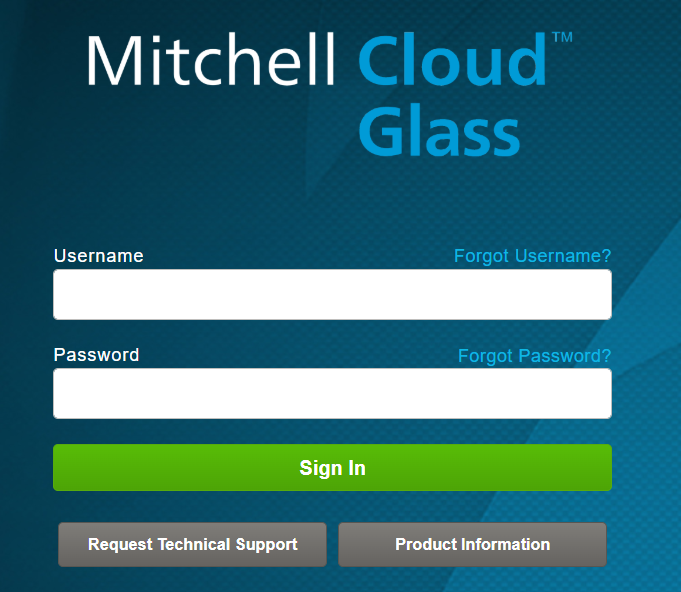
Use your username and password credentials to login to Mitchell Cloud Glass for Point of Sale.
How to
 Sign in
-
On the Mitchell Cloud Glass Login page, enter the username in the Username field.
-
Type the password in the Password field.
-
Click Sign In.
Reset Password
-
On the Mitchell Cloud Glass Login page, select the Forgot password? link above the password field.
-
In the Password Resert page, type your User Id and Email address associated with the account.
-
Click Send Password.
You will receive an email to the address associated with the User Id with instructions for resetting your password.
Obtain Forgotten Username
-
On the Mitchell Cloud Glass Login page, select the Forgot username? link above the username field.
-
On the Forgot your username page, type your Email address and Federal Tax Id associated with the account.
-
Click Send Username.
You will receive an email to the address associated with the User Id with your username.
If you do not receive an email for a password reset or username reminder, contact your System Administrator.
Reference
Window Components for the Mitchell Cloud Glass Point of Sale Login page
| Name | Description |
|---|---|
| Username | Your personal identification. Also called User Id. |
| Forgot username? | Way to have your username emailed to you after your email address and Federal Tax Id are verified |
| Password | Your personal password |
| Forgot password? | Way to reset your password with email instructions after your User Id and email address that are associated with the account are verified |
| Sign In | Authenticates your credentials and opens Mitchell Cloud Glass for Point of Sale |
| Request Technical Support | Opens a notice with the Mitchell technical support phone number (800-448-4401) or to contact your Mitchell representative. |
| Product Information | Brings you to the Mitchell Cloud Glass web page from Mitchell.com. |