Use Resource Lookup to Select a Resource
Use the Resource Lookup to assign work to a resource during the claims process. Use Resource Lookup to assign resources such as:
-
Adjusters
-
Reviewers
-
Appraisers
The Resource Lookup will be available whenever you need to assign work.
How to
 Open the Resource Lookup Window
Use one of the following methods to open the Resource Lookup window, depending on the specific task and workflow:
-
Select Choose Resource.
-
Select Resource Lookup.
-
Select
 .
.
Use the Resource Lookup Search Tab
-
In the Resource Lookup window, select the Search tab.
-
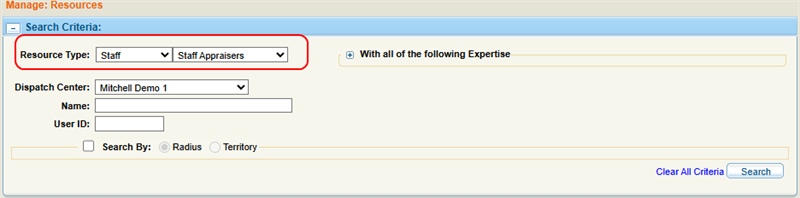
Select a Resource Type.
-
Optionally, enter any other desired search criteria.
-
Select Search.
-
Select the desired resource from the Search Results list.
-
Click Select.
Note: Resource Type is the only search criteria that is required, but you can add more search criteria to narrow results.
Use the Resource Lookup Browse Tab
-
In the Resource Lookup window, select the Browse tab.
-
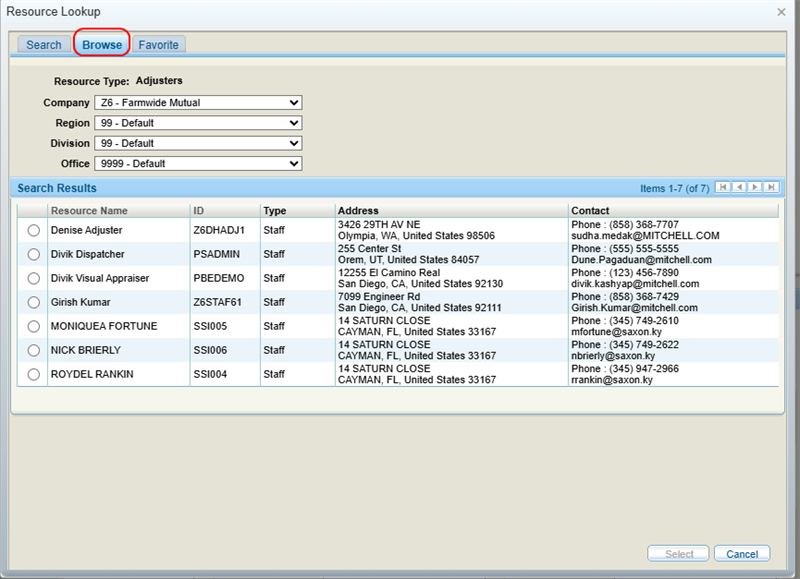
Select a Company, Region, Division, and Office from the appropriate lists.
-
Select the desired resource from the Search Results list.
-
Click Select.
Use the Resource Lookup Favorite Tab
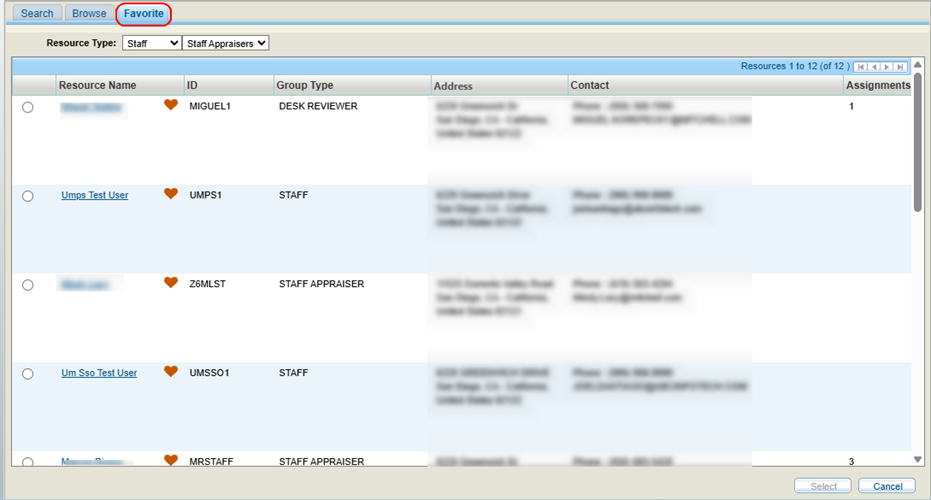
You can favorite a resource for easy access. See Favorite a Resource for more information.
To access the favorites list:
-
In the Resource Lookup window, select the Favorite tab.
-
Select the desired resource from the list.
-
Click Select.
Reference
Search Criteria Components
| Name | Description |
|---|---|
| Resource Type | Select either a Staff or Non-Staff resource from the first list, then select a category of staff or non-staff resource from the second list. |
| Only Shops in Network | If you have selected a Non-Staff Body Shop, select the check box to limit your search to shops that are in network. |
| Dispatch Center |
If applicable, select a dispatch center to view only appraisers assigned to that location. |
| Name | Enter the name of the resource. |
| User ID |
Enter the username of the resource. |
| With all of the following Expertise | Select the desired check box(es) to narrow the search to resources with specific areas of expertise. |
| Search By | Select the check box to narrow the search to resources within a specific area radius or territory. |
| Distance | Select a search radius distance (in miles) from the ZIP/postal code or address. |
| Country | Select a country. |
| Street Address | Enter the street address. |
| ZIP/Postal Code | Enter a ZIP/Postal Code. |
Search Results Components
| Name | Description |
|---|---|
| Resource Name | The resource's name. |
| Partnerships | Indicates how a resource connects with other systems, like Repair Center or MSO Integration. |
| ID |
The resource's unique identification number. |
| Group Type | The resource's category (staff, non-staff, shop, etc.) |
| Address |
The resource's address. |
| Contact | The resource's telephone and e-mail address. |
| Open Capacity | The number of appointments a shop can accept at a given time. |
| Rating | The rating you've given the resource. |
| Expertise | The resource's areas of expertise. |
| Assignments | The number of assignments currently assigned to the resource. |
| Distance | The resource's distance (in miles) from the ZIP/postal code or address you entered in the search. |
| Workload Factor |
The percentage of time the resource will take to complete the work. For example, if an assignment is 60 minutes and the appraiser will take 60 minutes to complete it, then the Workload Factor is 100%. |
| Capacity | The number of open or active repairs a body shop can have at any given time without accumulating a backlog. |
Related topics
